
I’ve been working on projects in Archicad 29 for the past few months. They were all started in Archicad 28, but I replaced all the Favorites with my Archicad 29 template Favorites in January. So it feels a bit like I’m working in my new template. On top of that I know what’s IN my new template, so I find these old projects extra annoying to work in as they’re missing some organizational updates (hello View Map reorganization). I also started three new projects in February and wanted to get two long term tasks into the template (both came up on one of the migrated projects mentioned above). The combination of all that means I’ve got a number of items to add to my template.
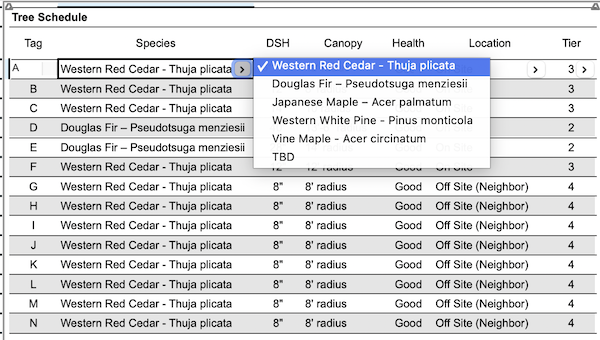
The first long term project was finally adding FAR diagrams to my template. The second was creating a tree schedule. Seattle loves trees and the permit department (SDCI) has been getting more particular about how trees are handled in permit sets. I finally created a set of Archicad Properties and a Schedule that makes documenting and managing trees in the set much easier. I’ve already used the new properties on two measures and they’re awesome. They not only make permitting easier (I’ve used the properties on two permits), they also make documenting existing conditions for trees way faster. I expect I’ll have more revisions to this later in 2026 when I have projects with more demanding tree requirements. But what I have so far makes me really happy.
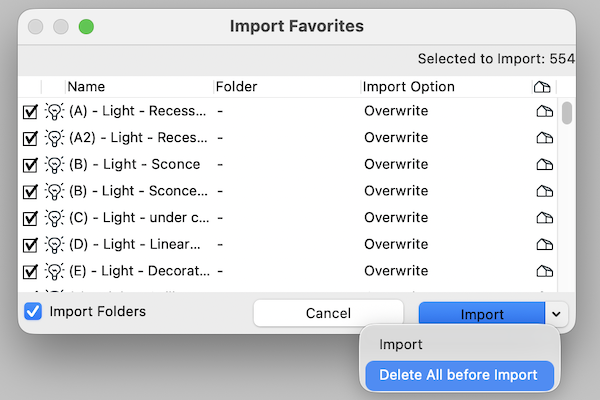
If you’ve already started a project in my new template, you can replace the Favorites and manually add items, or just not worry about the list below until you start a new project.
I also added two new keyboard shortcuts (show/hide origin and changing the page of a placed PDF) to my Work Environment. Both were added to my Work Environment without fanfare, so it’s possible if you downloaded my Work Environment in the past few weeks, you’re already using the version with one or both of those keyboard shortcuts. The keyboard shortcut for replace a page in a placed PDF is very very nice to have when reviewing/coordinating structural.
Ready to download the template? Click the big support button or go to the template page. As always the template is free; clicking the PayPal support button (below or on the template page) is optional. Every time PayPal sends me an email notification that someone clicked the support button—whether it’s for $5 or $300—it brightens my day. If you support my template with a contribution of $100 or more and send me an email with your address, I’ll ship you an 8 oz tumbler as a thank you. The PayPal button below will take you to the latest version of the Shoegnome Open Template.
Shoegnome Open Template v29.1 changes:
- Layer Combinations (Revised) – Removed 4 | Site – Property Line Layer from 1 | Floor Plan and 3 | Demolition Plan
- Layer Combinations (Revised) – 4 | Site – Fence Layer added to 1 | Site Plan
- Layer Combinations (New) – 6 | FAR Diagrams
- Layer (New) – 7 | Calculations – FAR.Annotation
- View Map (Revised) – changed Dimensioning to 1 | Dimensions – 1/4″ for Site Plan, Drainage and Wastewater Control Plan, and Soil Management Plan
- View Map (New) – FAR Diagrams
- View Map (Revised) – reorganized the Architectural folder
- Layout Book (Revised) – A001, added Tree Schedule
- Layout Book (Revised) – unchecked Transparent background on Wall Legend (A101, A102, A103)
- Layout Book (New) – A004 FAR Diagrams
- Favorite (Revised) – Updated Stair Walk line to have a size 10 triangle arrowhead and a size 6 circle arrrowhead
- Favorite (Revised) – Interior Elevations, revised vertical limit
- Favorite (Revised) – Ceiling – 1/2″ Gyp. Bd. and Ceiling – 5/8″ Gyp. Bd. revised default offset to Home Story
- Favorite (Revised/Renamed) – Bush – not in schedule
- Favorite (Revised/Renamed) – Landscaping – not in schedule
- Favorite (Revised/Renamed) – Tree – in schedule
- Favorite (New) – Chimney Brick
- Schedules (New) – Tree Schedule
- Archicad Properties (New) – Trees Group and Properties
- Composite (New) – 1 | Exterior Wall – Existing (4 3/8″)
- Composite (Revised) – updated some incorrect pen numbers for skin separator lines
- Element Transfer Settings (New) – 1 – Exclude Beam Length
- Element Transfer Settings (Revised/Renamed) – Renamed and reviewed all
- Keynote (New) – T 02 Chimneys and Fireplaces (keynote describing workflow)
Shoegnome Open Template v29.11 changes (updated 2/26/2026):
- Layer Combinations (Revised) – Removed 4 | Site – Property Line Layer from 5 | Schematic Design
- View Map (Revised) – Changed Schematic Plans Graphic Overrides to 2 | Poched, Zones (Color), New Walls (Green)
- Favorite (Revised) – Stair Walk Line, reversed arrow and circle
- Attributes (Reindexed) – Reindexed Composite 1 | Exterior Wall – Existing (4 3/8″) to #103
- Favorite (Revised) – Water Heater – Tank, gas, removed connections
- Favorite (Revised) – Water Heater – Tankless, gas removed connections
Shoegnome Work Environment for Archicad 29 changes:
- Keyboard shortcut (New) – Origin Display set to \
- Keyboard shortcut (New) – Replace Page… set to `
What are you waiting for?
Get the template and the work environment now.
Download the Shoegnome Open Template for Archicad 29
Download the Shoegnome Work Environment for Archicad 29
If you want all the latest Shoegnome Open Template news, sign up for the mailing list
If you aren’t using the current version of Archicad, you can download older versions of my template. If you use my template, I highly recommend you use my Work Environment as well. The two work together well and the Work Environment is designed to reinforce the best practices of the template. You can download my Work Environment here.
Subscribe to my blog to read more about the tricky world of being an Architect in the 21st century. Follow Shoegnome on Facebook, Instagram, and Youtube.