
ArchiSUMMIT 2021 Teaser and Bonus Content
I ended up creating way too much content for ArchiSUMMIT 2021. So here’s a teaser / bonus video with a bunch of extra tips and tricks.

I ended up creating way too much content for ArchiSUMMIT 2021. So here’s a teaser / bonus video with a bunch of extra tips and tricks.

Sections and Details in ARCHICAD require a combination of 2D and 3D information. This blog post talks how to handle the 2D.

In this video I discuss how to I prefer to model roof assemblies in ARCHICAD.

Complex Profiles need to be built correctly or they can cause a lot of problems in an ARCHICAD model. Here’s one simple technique to remember.

Do you know how to show Section Markers in Elevations in ARCHICAD? Here’s a video showing you the most efficient way to do it.

Today I decided a blog comment would be easiest explained in video format: foundations and footings in ARCHICAD.

I recorded a quick video on modeling rocks and boulders in ArchiCAD, using imported elements from SketchUp and/or the Morph Tool.

In this video I talk about how to create monochromatic models in ArchiCAD. There are a few techniques and they all offer some great potential.

Once I figured out this technique to create Complex Profile siding in ArchiCAD, my models became about 20% cooler.

My ArchiCAD videos tend to come in pairs. Here’s the follow up to yesterday’s video. In this video I focus more on the Interior Elevation Tool itself.

Do you need to create Interior Elevations in ArchiCAD? Of course you do. We all do. Are you creating them in the best possible way? Watch this video and find out. Got something to add? Share your tips in the comments.
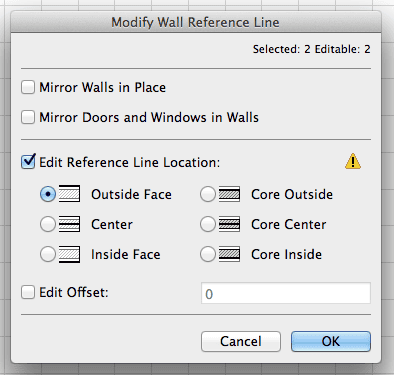
Curious about all the changes big and small in ArchiCAD 17? Read what developer James Badcock has to say about Modify Reference Line and Plane in AC17.

As I sit here, working on some upcoming features for an upcoming version of ArchiCAD, I’d like to reflect on my time before working here at Graphisoft HQ as a Product Designer, when I was a user of ArchiCAD. My fanboy status for the program started back in the late 90’s at the University of Tasmania where ArchiCAD, version 5.1 at the time, was the only architectural software we were
Are you a little nervous about moving to the latest version of ArchiCAD? Are the mysteries of a whole new attribute a bit daunting? You are not alone. Here are two great resources for you to better understand what Building Materials are all about. An Article Thomas M. Simmons, the founder of ARCHVISTA, wrote a really informative and succinct article for AECbytes. You can read the whole article here. If

This is my third video on modeling chimneys in ArchiCAD. The first covered Complex Profiles and the second discussed the Morph Tool. A HUGE thank you to Gorazd Rajh of Pilon AEC (the reseller of ArchiCAD in Slovenia) for sharing this bonus modeling tip with me. While building the chimney with the Morph Tool, I had one major issue-I struggled to use the tube command. Well thanks to Gorazd I
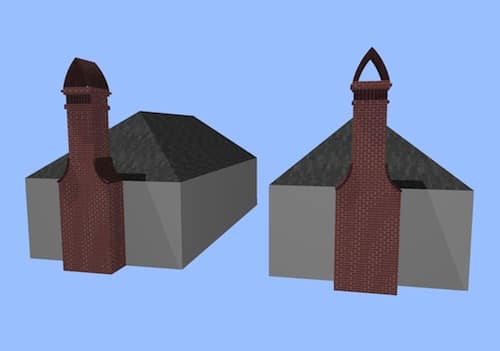
In response to my earlier video on modeling tips for chimneys in ArchiCAD, some readers pointed out that the Morph Tool also offers a great way to do these types of chimneys (or similarly complex forms). I completely agree. Therefor it seemed like I should model that same chimney using Morphs and see what happens. So here it is. That same chimney, but with Morphs! Morphs or Complex Profiles: The
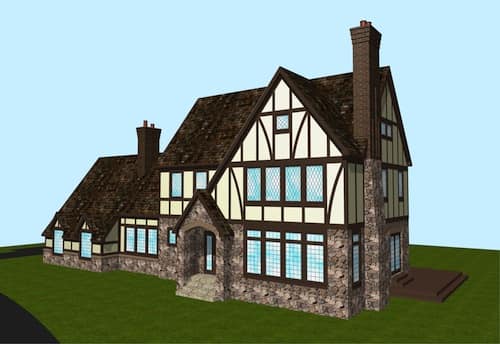
When doing remodels, I often come across some weird chimneys. Likewise when doing new construction, certain architectural styles suggest less than plain chimneys. Here’s a video sharing some tips on how to make good looking chimneys in ArchiCAD. Of course these modeling tips and techniques could be used for other forms. Think of chimney modeling as a proxy for all sorts of non-standard shapes. And this is just the beginning.
…and those of us wanting a quick reminder of some basic ArchiCAD skills on this last day of the year. I always like reading through top 10 or top 20 lists of tricks. Especially for new users. I’m often reminded of something I forgot (or never knew). And I’m always looking for better ways to explain the fundamentals. Thanks to Othon Dafos for sharing this on the ArchiCAD Users Association

Dimensions in ArchiCAD are super basic, right? Well here’s a video on some tips, tricks, and cheats regarding this essential tool. I cover about 15 to 20 different aspects of ArchiCAD’s Dimension Tool. So clearly not an exhaustive or comprehensive discussion. If there’s interest, I’ll gladly do more videos like this for various tools and features with ArchiCAD (ei, back to basics videos). Hopefully regardless of your skill level a
This is the first time I’m cross posting something I wrote on BIM Engine here as well. If you use ArchiCAD, you’ll want to read about the Attribute Manager. And you’ll also want to download the .aat file that I provide at the end of the post. Be warned it’s a long post and it might require more than one reading. Please post comments there rather than here. Fixing Error
I just started using Command-Tab to pull up the Mac Application Switcher. I’ve accidentally used it before, but never intentionally. It’s AWESOME for quickly switching between multiple ArchiCAD files. Which happens to be something I’m doing a lot of right now. If you’re not familiar with the Mac Application Switcher, a quick Google Search will reveal a bunch of tricks that it can do. But what I’m really loving right
There are a lot of little tweaks in every version of ArchiCAD that don’t get top billing. Or any billing at all. Yet some of these changes are huge and exciting for us nerdy, obsessive users. There is a great list (started by ArchiCAD Hero Link Ellis) from last year on the ArchiCAD forum detailing all these unannounced changes for ArchiCAD 15. I wrote a post about it. Discover both

While doing some experimentation on an ArchiCAD 15 file that I’d opened in ArchiCAD 16, I came across a weird quark with the Morph Tool. The pet palette for the Morph Tool wasn’t showing me all the options. I was bewildered and annoyed. I wasn’t sure what was going on and I just wanted ArchiCAD to work the way I knew it should. I was pissed. Fortunately I did what
My second year of blogging I’m now at two years of never missing a week. I can’t believe that. This is post 213, which means I’m averaging slightly OVER 2 posts a week. I did not plan on that. I really meant to do only one post a week. I guess since I quit my day job, I’ve just been having too much fun posting and thinking about ArchiCAD. We

Glitch Or Hidden Magic? When exploring ArchiCAD, I often find things and need to ask myself “Glitch or Hidden Magic?” Sadly this post about Conditional Operators is an example of a great glitch. Hopefully Graphisoft will either remove it so I stop trying to use it or make it a real function (it is a little finicky in ArchiCAD 15). I hope they make it a reliable function because it’s
I found an excuse to combine my love of art cars and ArchiCAD I can’t tell you how much time I’ve spent trying to match shadows in renderings to photos. Why didn’t I think of this before? All digital photos have a date and time stamp. Plug that into ArchiCAD (3D projection settings/more sun), pick your location, set your project north correctly and that should be that. This photo was

It’s time to demystify walls AND make your coworkers think you have magical ArchiCAD powers… Do you hate when walls don’t join properly or when hatch patterns in elevation randomly don’t align? In this video I talk about the Modify Wall menu and how it demystifies those issues. I won’t promise that the Modify Wall menu will solve every one of those problems. BUT once you are familiar with its
Since the release of ArchiCAD 15 I’ve enjoyed using the shell tool–more for it’s ability to be reshaped in 3D, plan, section, and elevation than its crazy form-making opportunities. BIMES has created a 4 minute video that highlights how impressive and versatile the shell tool is and I am just blown away. Enjoy. This video originally came from a blog post by BIMES that explains the origin and reasoning behind this

Tonight I recorded two videos. Making these videos reminds me of how I first learned ArchiCAD. I spent a fair amount of time sitting behind one of my coworkers, just watching him work. It was very enlightening. And as I rewatch my videos, I notice a bunch of little techniques that I take for granted, but are probably as enlightening as the main focus of the video. The first video

Over the past year and a half of blogging I’ve had many small ArchiCAD tips and tricks that I wanted to share, but could never find the proper way to write about them. The aggregate of these tricks help me to easily problem solve within ArchiCAD and produce the quality drawings I desire, but these techniques don’t readily lend themselves to a blog post of a few hundred words. They
A couple of weeks ago I wrote a post on groups in ArchiCAD. It has quickly become one of my most popular. If you haven’t read that post, you might want to start here. Well I’ve been thinking more about groups since then. And Link Ellis (one of my ArchiCAD heroes) offered some great additions to the list in this LinkedIn post. Below is a summary of Link’s thoughts (4.
Let’s start with the basics and get a bit more complex. 1. The enable/suspend groups button should always be visible. If the button looks like the image below, then groups are enabled. Otherwise they are suspended. 2. It’s a good idea to have shortcuts for enable/suspend groups, group, and ungroup. This is what I use: command+G: group option+G: enable/suspend groups command+option+G: ungroup 3. When groups are enabled, you move the