Modeling

ArchiCAD Basics: Align and Distribute

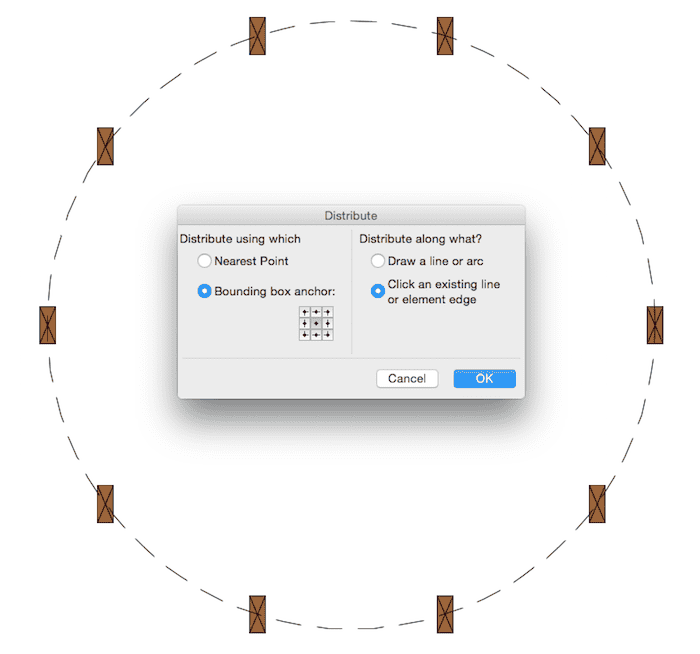
Align and Distribute are nothing new and I’m sure these commands are rarely (if ever) on anyone’s Top 10 Most Important ArchiCAD Features list. But they are still quite valuable. Let me explain why, plus show you some basics in the accompanying video.

Read More

Guest Blogger Kristian Bursell: ARCHICAD GDL vs REVIT FAMILIES

Recently I spent a great deal of time working with Revit Families (RFA’s) to determine their capabilities. I approached this endeavor with no bias; as most mathematicians will tell you, it is all about potential with personal preference a liability. Though I could write a book on the topic of ArchiCAD GDL vs Revit Families I’m going to be as brief as possible and hopefully expand in later posts. Basic

Read More

ArchiCAD Modeling Tips – BONUS VIDEO!

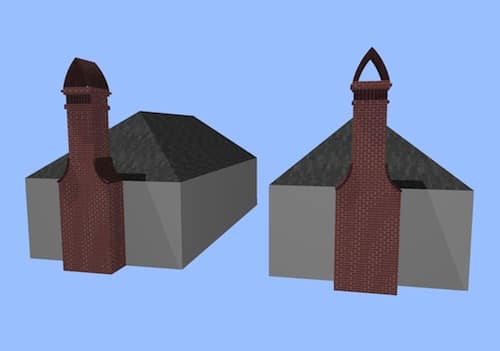
This is my third video on modeling chimneys in ArchiCAD. The first covered Complex Profiles and the second discussed the Morph Tool. A HUGE thank you to Gorazd Rajh of Pilon AEC (the reseller of ArchiCAD in Slovenia) for sharing this bonus modeling tip with me. While building the chimney with the Morph Tool, I had one major issue-I struggled to use the tube command. Well thanks to Gorazd I
Read More

Modeling tips for Chimneys in ArchiCAD Redux

In response to my earlier video on modeling tips for chimneys in ArchiCAD, some readers pointed out that the Morph Tool also offers a great way to do these types of chimneys (or similarly complex forms). I completely agree. Therefor it seemed like I should model that same chimney using Morphs and see what happens. So here it is. That same chimney, but with Morphs! Morphs or Complex Profiles: The

Read More

Modeling tips for Chimneys in ArchiCAD

When doing remodels, I often come across some weird chimneys. Likewise when doing new construction, certain architectural styles suggest less than plain chimneys. Here’s a video sharing some tips on how to make good looking chimneys in ArchiCAD. Of course these modeling tips and techniques could be used for other forms. Think of chimney modeling as a proxy for all sorts of non-standard shapes. And this is just the beginning.

Read More

Guest Blogger Kata Danis: Reinforcement plans in ArchiCAD

ArchiCAD is considered to be a modeling program for architects only. We at Eptar Ltd. however do not think that is the case. We believe that ArchiCAD can be made capable of handling not only architects’ but other designers’ preferences as well. The [eptar] Reinforcement solution was developed to make sure that architects and structural engineers can work together in ArchiCAD on the same BIM model. While developing the solution

Read More

Guest Blogger Kata Danis: [eptar] Tiling Accessory for ArchiCAD

Creating wall and floor tiling plans in ArchiCAD Creating wall and floor tiling plans in ArchiCAD can be a troublesome task. The abilities of built-in elements and textures of ArchiCAD are limited when it comes to modelling and arranging tiles. In order to make these tasks easier, you could choose to download and use [eptar]’s wall and floor tiling application for ArchiCAD. This application will not only help you draw

Read More

Two Morph Videos that aren’t flashy, but that’s the whole point

The Morph Tool Allows pleasant Surprises There are a lot of great examples of what the Morph Tool in ArchiCAD 16 can do. If you want to see some crazy shapes and amazing forms, the videos in this post will disappoint you. If you want to start thinking about how to integrate the Morph Tool into your design process, then keep reading and watching. The first video shows a quick

Read More

Fun with Slabs – AKA Archi-treeStump and Slab ramps. Yes. Slab ramps.

Did you know you can make a ramp using just a slab and nothing else? Recently I’ve had opportunities to model quite a few schematic designs and imaginary buildings for the creation of renderings and walk-through movies. I love working on these types of models in ArchiCAD. A part of me would be happy to just get paid to design and model imaginary structures (take that as a hint). You

Read More

Modify Wall – a video exploration of a great function

It’s time to demystify walls AND make your coworkers think you have magical ArchiCAD powers… Do you hate when walls don’t join properly or when hatch patterns in elevation randomly don’t align? In this video I talk about the Modify Wall menu and how it demystifies those issues. I won’t promise that the Modify Wall menu will solve every one of those problems. BUT once you are familiar with its

Read More

Adventures in GDL — guest blogger Kristian Bursell shares the origins of CADSwift

I officially entered the building design realm through the Architecture and Environmental Design course at the University of Canberra. After constantly being told that my ideals were that of a dreamer I became unsure of myself and decided the safe option was to follow the notions of friends, family and university Lecturer’s on “what life is”. However I felt nothing when I reached the milestones they said would bring fulfilment;

Read More

Eric Bobrow Site Modeling Tips. It gets REALLY good at about 6:08

Eric Bobrow has a lot of great free videos; he’s recently posted a bunch of new ones on his website that highlight his 7 Keys to Best Practices for ArchiCAD. But my favorite one is still his terrain modeling video. The technique he shares around minute six has come up a lot recently (not only in my own work and that of my coworkers, but also in the work of

Read More

TVs, Plotters, Computer Screens, Paintings, and Self Promotion

Paintings and the Art of Self-Referencing A year ago I wrote about putting paintings and wall art in models. I recommended a trick using walls, niches, and aligning 3D textures. It’s a good technique, but I have to admit that I now rarely use it for hanging pictures. I finally got around to using the Picture 15 object. It’s great and fast. Put whatever image you want in your loaded

Read More

Stained Glass Tutorial

I recently had to model a Queen Anne house in ArchiCAD to produce some renderings for a client. It was a ton of fun. And I learned some cool tricks while modeling the various trim and ornamentation. I have to admit, of all the things I’ve done in ArchiCAD, this model is my favorite. Unfortunately I can’t share images of the entire house until the overall project is completed later

Read More

Locked Doors and Red Doors… guiding clients through BIMx

As I was developing my BIMx competition entry, I tried to give each room or area in the file something special. There was the zombie soldier with the axe in his back walking towards the tank, the horde of zombies in the yard, the blackened trees, the ominous sky, the burned out upper story, the hole in the floor when you enter the master bathroom that drops you down to

Read More

Adventures in GDL – guest blogger Jeroen de Bruin talks about being a GDL Specialist

My adventure started after finishing a bachelor in architecture and working in several architects’ offices. I found that drafting in 2D really annoyed me: First draw the floor plan, then the elevations, manually add in shadows… and then the architect changes the design and you start over again. Those painstaking hours of checking if the elevation matched the floor plan… If only there had been an ArchiCAD feature like Trace

Read More

From AutoCAD (to ArchiCAD) to SketchUp… a race

Recent History Over the past few months I’ve made a couple of terrain models in ArchiCAD 14 and then exported them to SketchUp 8. At first this was done to figure out a way to collaborate with a fellow architect who is an avid SketchUp user. We both wanted to work in the program we knew best. After I modeled the first site it became evident that it was incredibly

Read More

Invisible Beams… aka Rookie Mistake… aka Expert Trick

Hidden walls and beams can cut visible elements, and not all trimming is done with SEOs or the trim to roof command. This is most often seen by new users when they don’t yet understand layer intersection groups and priority numbers. Hidden elements on layers that don’t have their intersection groups set to zero can cut and merge with visible objects. While this is a common rookie mistake, it can

Read More

Conditional Operators… aka Graphic Operators… aka POST 100

(note: if you read this before 11 pm on Sunday June 19th, 2011, you should reread it as I’ve made some important updates) In many 2D drawings (whether done by hand or flatcad) parts of objects are left undrawn for clarity. Railings, for instance, are cut in front of elevations to better show what’s beyond. How do you do that in ArchiCAD without completely turning off the railing and adding

Read More

Paintings and Frames

There are a couple ways to hang a picture in an ArchiCAD project. There is an object which I can never find in the library when I look for it. There’s also the object mentioned in this forum post. My preferred solution is to place a wall that is as wide, deep, and high as the desired frame (say 2′-11 1/2″ x 4′-8″ x 1″). Then place a niche into

Read More

Frameless Doors

ArchiCAD, from my experience, doesn’t like making frameless doors. It seems so obvious, just set the frame dimensions to zero, press okay, and then go to lunch. Try again. If you go the simple route of setting the frame to zero, archicad will freak out. It might work in 3D, but you’ll get lots of error messages. I don’t like error messages. One solution is to make a custom door.

Read More

Some Kitchens

I model all the major elements in kitchens. However the detail across the kitchen is usually a mix of 2D and 3D. In one kitchen, 08113, we spent a lot of time working on two elevations with the client. We sent tons of 3D views similar to those below. Because of this, I modeled all the cabinet doors for about a dozen different variations. In contrast the island, which the

Read More

Dashed Lines, Crazy Ramps, and Trees

The other users on the ArchiCAD-Talk Forum never cease to surprise and amaze me. There’s so much to be learned from them. Here’s my three favorite posts from the past few days. Dashed Lines on adjoining slabs I never knew ArchiCAD could model this, let alone in so many ways Take that SketchUp! And this too!

Read More

A quick word on details, cabinets, and walls

Do I use ArchiCAD to its fullest? Not even close. Is my work a combination of 2D & 3D? of course. Each project is more 3D and less 2D. However, it’s not about 100% 3D vs. 100% 2D or 100% parametric vs. 100% dumb lines and objects. It’s about utility. With my current workflow, and that of the people I work with, there’s a balance of usefulness. New construction walls,

Read More

Operators

I keep the majority of my operators on a hidden layer called Operators. However it’s a pain to turn on the layer when I need it on. In times past I’d either go to the layers, select operator, turn it on, or I’d go to an “all on” layer combination, or a special layer combination that was a “3D + operators,” or I’d select a slab, change it to the

Read More

There are better uses of a machine that sends messages to the past, but…

I’m excited about version 14. I started using ArchiCAD on version 9, dabbled in 8.1, 10, 12, and 13, and have been using v11 since it was released. While working on my first project in v11 back in 2007, I discovered the joys of the complex profile in ArchiCAD. If you use ArchiCAD, but don’t use this tool to its breaking point…finish reading and then go spend as much time

Read More
Scroll to Top